How to Beat ATS Resume Filters in 2026
Chintan Poriya
Lead Career Editor & AI Research Director
Published: January 7, 2026
Table of Contents
We almost passed on a genuinely strong candidate last year because her resume came into our applicant tracker as a wall of scrambled text. The two-column layout with little skill icons looked sharp in the PDF she'd sent, but our ATS read the columns left to right across the page instead of down each one, mixing her work history with her skills list into something that made no sense. I only caught it because her name looked familiar from a LinkedIn connection and I pulled up the original file manually. Most candidates in that position never get that second look.
That's the actual problem with ATS filters they're not hunting for reasons to reject you. They're just software, reading structure, and a resume built for visual flair over readability loses information the moment it gets parsed. Here's what's actually happening on the other side of that submit button, and how to build a resume that survives it. You can test your draft beforehand using our free ATS Score Checker, or generate a compliant single-column structure with our AI Resume Generator.
What an ATS Actually Is
An Applicant Tracking System is the software that collects and organizes applications before a human ever opens most of them. Instead of a recruiter manually reading every resume, they search within the system using keywords tied to the role and the system pulls out structured pieces like job titles, skills, dates, and contact details to make that search possible.
If your resume's structure confuses that parsing step, none of your actual experience matters, because the system never extracted it correctly in the first place.
Why Companies Actually Use One
For a single posting, we've had well over a hundred applications land in a matter of days. Reading every one manually, start to finish, simply isn't realistic at that volume. The ATS lets us search, filter, and compare quickly.
Understanding that this is fundamentally a search and organization tool not an adversary trying to filter you out changes how you should build a resume for it.
How the Parsing Actually Works
The system scans for structured information: name, contact details, job titles, employment dates, skills, education, certifications, and keywords tied to the role. It's reading for structure first, not evaluating tone or personality the way a person would. The cleaner and more predictable that structure is, the more accurately it gets pulled into the system correctly which is exactly where the two-column resume above went wrong.
Keep the Format Simple
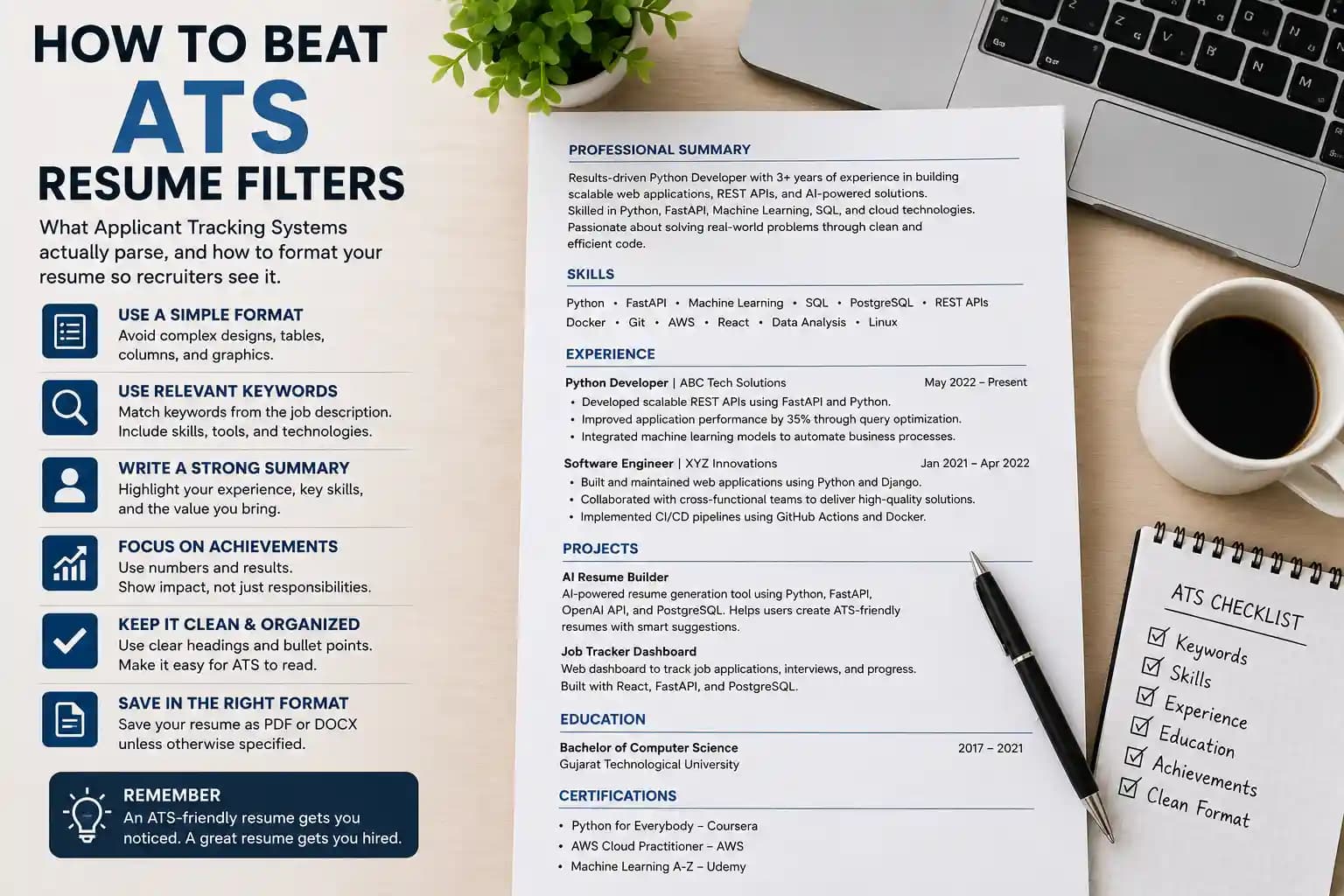
Skip the multi-column layouts, decorative icons, and heavy graphic design. Use a single-column layout with clear standard headings. It's less visually flashy, and it's also the version that actually reaches a recruiter intact.
Tailor Every Application, Every Time
Sending the identical resume to every posting is one of the most common reasons a genuinely qualified application gets missed. Read the actual job description and let the real skills it mentions Python, Machine Learning, FastAPI, SQL, REST APIs, whatever applies show up naturally in your resume, provided they genuinely reflect your experience.
Never add a keyword you can't back up; we ask follow-up questions specifically to catch that.
Write a Summary That Actually Says Something
Compare these two approaches:
"Results-driven professional seeking growth opportunities"
"Python developer with 3+ years building scalable web applications and AI-powered tools using FastAPI, ML, and SQL."
The second one gives both the ATS and the recruiter something concrete to match against the role the first one matches nothing because it says nothing.
Build a Real Skills Section
List the technical skills relevant to your target role clearly, in their own section. Keep it current; a skills section listing tools you haven't touched in three years does more harm than good once a follow-up question lands on it.
Show Results, Not Just Duties
"Responsible for developing websites" tells us nothing about impact. "Developed scalable web applications using Python and FastAPI, cutting response times by 35%" tells us exactly what changed because you were there. Specific, honest numbers consistently outperform vague duty statements.
Include Real Projects
Projects matter especially for students and career changers without a long work history sometimes more than the work experience itself. For each one: name, a short description, technologies used, your actual contribution, and the outcome. Something like an AI resume builder built with Python, FastAPI, and OpenAI's API tells us more in three lines than a page of generic bullet points would.
Use Section Headings the System Actually Recognizes
These are standard headings that both ATS software and a skimming recruiter recognize instantly. Creative alternatives like "My Journey" look nice to a human reading slowly, but confuse a system that's trained to look for the standard version.
Save It in the Right Format
PDF is generally the safest choice for preserving formatting across systems, and .docx is widely accepted as well unless the job posting specifies something different, in which case follow that instruction exactly. It sounds like a minor detail, but plenty of applications get flagged purely for the wrong file type before content is even considered.
Formatting Mistakes That Actually Break Parsing
Avoid These Entirely
Multiple columns
Text embedded inside images
Tables holding important content
Icons standing in for actual words
Unusual, custom fonts
Heavy color use
Content tucked into a header or footer
Keyword stuffing fake skills
A Checklist Before You Submit
- A specific, non-generic professional summary
- Relevant keywords pulled from the actual job description
- A clearly listed, current technical skills section
- Quantifiable achievements, not just duties
- Updated, correct contact information
- Real projects that show what you can build
- Education and certifications listed cleanly
- Consistent formatting throughout
- No spelling or grammar errors
- Standard section headings the system will recognize
A Few More Things That Actually Move the Needle
Beyond the ATS-specific fixes: make sure your LinkedIn profile matches your resume a mismatch is one of the fastest things we notice and it raises a question before we've even talked to you. Keep the resume to one or two pages. Use a professional email address, not the one you made in school. Keep skills and certifications current. And read the whole thing out loud once before it goes out it catches more than a silent read-through ever does.
Final Thoughts
An ATS isn't built to reject good candidates it's built to help a small hiring team manage what would otherwise be an unmanageable pile of applications. Once you understand it's reading for structure rather than judging you, the fix stops feeling like a trick and starts feeling like basic clarity: clean formatting, honest keywords, real achievements, and a resume tailored to the actual role in front of you.
The goal was never just to get past the software. It's to make sure the strongest version of your actual experience is what the recruiter ends up reading the same way that candidate's real experience almost got lost behind a template that looked good and read badly.
FAQ
Does using a creative resume template automatically mean I'll get filtered out?
Not automatically, but it raises real risk. Some ATS platforms parse columns and icons better than others, and you have no way of knowing which system you're up against. A simple, single-column format removes that risk entirely.
Should I list every keyword from the job posting even if I'm only somewhat familiar with it?
No. Only include what you can genuinely discuss in an interview. Keyword stuffing tends to get caught quickly once a human reads the resume, and it can hurt more than a shorter, honest list would.
Is PDF always the safest file format for ATS systems?
Generally, yes, though some older systems parse .docx more reliably. Always follow whatever format the job posting specifically requests before defaulting to PDF.
How different should my resume be for each application?
The core structure and most content can stay the same what should shift each time is the summary, the order of highlighted skills, and which project or achievement gets emphasized based on that specific posting.
Written by Chintan Poriya, Marketing Head.
Read More in Resume & Job Tips
The Job Search Has Changed: How to Build a Resume and Career Strategy That Works in 2026
The candidate we eventually hired wasn't the most experienced person who applied. She was the only one who could tell us exactly which version of her resume she'd sent and why. Here's the job search system that actually works in 2026, whatever field you're in.
Read article →
AI Skills Are the New Resume: Why Employers Care More About What You Can Build Than What You Know
A candidate with a master's in computer science went quiet when I asked what she'd built outside coursework. Another had no degree, but walked me through a live tool she'd deployed herself, bugs and all. Here's what actually shifted.
Read article →