Best AI Tools for Job Seekers in 2026 (What We Actually Notice From the Hiring Side)
Chintan Poriya
Lead Career Editor & AI Research Director
Published: December 24, 2025
Table of Contents
Two applications landed for the same role within an hour of each other last quarter. One cover letter opened strong, then dropped a competitor's company name into paragraph two an old AI draft, half-edited, never fully checked before sending. The other candidate referenced a specific product update we'd shipped three weeks earlier, in enough detail that it was obviously real research, not a generic line. She mentioned later, once she'd started, that she'd been tracking every application in a Notion database company, role, interview notes, follow-up dates, all in one place.
That's not why we hired her. But it's exactly the kind of organized process that keeps you from pasting the wrong company name into a cover letter at 11 PM.
That's the actual gap AI tools close during a job search not doing the work for you, but removing the chaos that causes avoidable mistakes and letting you focus on the parts that actually require judgment. Here's the toolkit worth building.
Why Bother With This Instead of Just Applying Everywhere
A job search touches a lot of moving pieces at once resumes, cover letters, interview prep, LinkedIn, company research, follow-ups and doing all of it manually, especially across many applications, is where quality slips. AI tools used well don't replace that effort. They remove the repetitive parts so what's left is sharper: a resume that's actually tailored, research that's actually done, answers that are actually practiced.
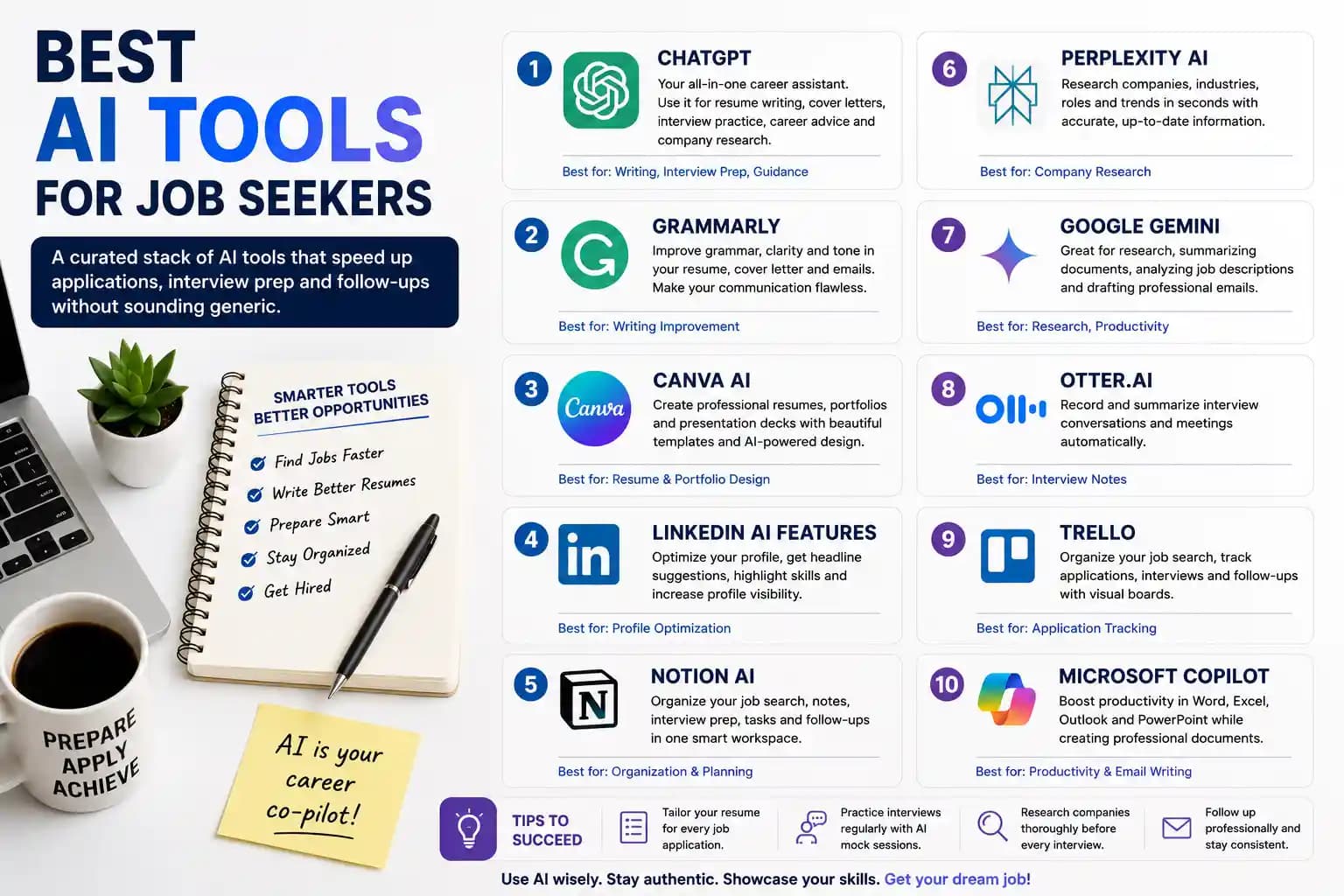
ChatGPT
Resume Help, Interview Practice, Research
The most versatile tool on this list. Beyond drafting and tightening resume language, it's genuinely useful for mock interviews a prompt like "act as a recruiter interviewing me for a Python Developer role, ask one question at a time, give feedback after each answer" turns it into real practice instead of passive reading. We've written a full piece on this specific use if you want the deeper version.
Grammarly
Catching What a Tired Read-Through Misses
Small errors read as carelessness to a recruiter, fair or not. Grammarly catches grammar, tone, and clarity issues in resumes, cover letters, and follow-up emails the kind of thing that's nearly invisible to you after reading your own draft five times.
Canva AI
Resume and Portfolio Design That Doesn't Fight the ATS
Useful for building a clean portfolio page or presentation-style resume for creative roles, though for most technical applications a simple text-based format still parses better through applicant tracking systems. Worth reading up on if that's a concern we've covered ATS formatting specifically elsewhere.
LinkedIn's Built-In AI Features
Profile Optimization
Suggestions for headlines, summary wording, and skill highlighting that genuinely help visibility. A profile that matches your resume, kept current, is one of the fastest things we check before an interview a stale or mismatched profile is a small but noticeable red flag.
Notion AI
This Is What Kept the Second Candidate Organized
Track applied companies, interview dates, recruiter names, salary ranges, follow-up reminders, and notes from every conversation in one workspace. It sounds like overkill until you're six applications deep and can't remember which interviewer asked what. That single habit is a big part of why the candidate from the opening never confused which product she was talking about.
Perplexity AI
Fast, Sourced Company Research
Background, products, leadership, recent news, competitors all with citations you can actually check, rather than a confident-sounding but unverified summary. This is exactly the tool that would've caught the wrong-company-name mistake before it ever reached a cover letter.
Google Gemini
Research and Workspace Integration
Useful for summarizing job descriptions, drafting emails, and organizing notes if you're already living in Google Docs and Gmail day to day. The integration is the actual value here, not a dramatically different capability from other tools.
Microsoft Copilot
For Anyone Living in Office
Drafting emails, refining resumes in Word, analyzing data in Excel, building interview presentation materials in PowerPoint. If your workflow is Microsoft-based already, this removes friction rather than adding a new tool to learn.
Otter.ai
Never Losing Track of What Was Actually Said
Records and summarizes conversations automatically genuinely useful after a virtual interview when you're trying to recall a specific detail a recruiter mentioned, or preparing notes for a follow-up thank-you message that references something real from the conversation instead of a generic line.
Trello
Visual Application Tracking
Columns like Jobs to Apply, Applications Submitted, Interviews Scheduled, Waiting for Response, Offers Received. Simple, but seeing the whole pipeline at a glance reduces the low-grade stress of wondering what you're actually waiting on.
Building a Toolkit That Doesn't Become Its Own Job
| Task | Recommended Tool |
|---|---|
| Resume writing | ChatGPT |
| Grammar and clarity | Grammarly |
| Resume/portfolio design | Canva AI |
| LinkedIn optimization | LinkedIn's AI features |
| Company research | Perplexity AI |
| Interview practice | ChatGPT |
| Application tracking | Notion AI |
| Task management | Trello |
| Email drafting | Microsoft Copilot |
| Interview notes | Otter.ai |
You don't need all ten running at once. Pick the three or four that solve your actual bottleneck research, organization, writing, or practice and build from there.
Using This Responsibly
Use AI to sharpen clarity, save time on repetitive drafting, generate starting ideas, practice interview answers, and keep information organized. Don't use it to paste in unedited generic content, invent details about your experience, exaggerate skills you can't back up in conversation, or send the identical cover letter everywhere with only the company name swapped which is exactly how a competitor's name ends up in the wrong paragraph.
Mistakes That Show Up Constantly on Our End
What to Avoid
Generic, clearly AI-written resumes with nothing personal added.
The same cover letter reused across applications with just a find-and-replace on the company name.
Skipping company research entirely it's obvious within the first two interview answers.
Sending AI-generated content that was never actually proofread.
Interview answers that sound rehearsed rather than personalized to the actual role.
Applying without tailoring the resume at all.
None of these are AI's fault they're what happens when AI output gets treated as a finished product instead of a draft.
What Actually Improves Your Results
- Tailor the resume every time, even when it's tempting to skip that step for the tenth application in a week.
- Practice interviews regularly, not just the night before.
- Keep LinkedIn current and matched to your resume.
- Build a portfolio that shows real work, not just claims about it.
- Follow up professionally after interviews a short, specific note referencing something real from the conversation goes further than people expect.
- Keep learning and adding relevant skills.
- Review every AI-generated document before it goes out that single step would've caught the mistake from this article's opening before it ever reached anyone's inbox.
Final Thoughts
AI has become a genuinely useful companion for a job search, but it's a companion, not a replacement for judgment. We don't hire prompts we hire people who can back up what's on the page in a real conversation. Use these tools to remove friction: faster drafts, better organization, real interview practice, sharper research. Then make sure what actually goes out the door sounds like you, checked carefully, and true.
A well-organized, well-prepared application beats a flood of generic ones every time we've watched it play out on our end and that gap is almost entirely about how these tools get used, not whether they're used at all.
FAQ
Do I need to pay for premium versions of these AI tools to see real benefit?
No. Free tiers of ChatGPT, Grammarly, Canva, Notion, and most others on this list cover what a typical job search actually needs. Paid upgrades matter more once your usage becomes very heavy or specialized.
Is it obvious to recruiters when a resume or cover letter was written entirely by AI?
Often, yes generic phrasing and a lack of specific detail are the giveaways, not the fact that a tool was used. A resume with real specifics and personal edits reads completely differently from an unedited first draft.
How many of these tools should I actually be using at once?
Three or four is realistic for most people one for writing, one for research, one for organization, and possibly one for interview practice. More than that tends to add overhead rather than value.
What's the single most common mistake job seekers make with AI tools?
Sending AI-generated content without reviewing or personalizing it first the wrong-company-name mistake from this article's opening is a direct result of exactly that.
Written by Chintan Poriya, Marketing Head.
Read More in AI Tools for Work
AI Agents Are Getting Access to Your Business: Why Identity Security Matters in 2026
One of our own automations was wired to a single API key meant only to check order status. A routine review found that same key could also delete listings and issue refunds. Nothing went wrong, but it easily could have.
Read article →
AI Observability in 2026: The Hidden Skill Behind Reliable AI Applications
Every dashboard for our support chatbot showed green, uptime, CPU, response time, all fine. Customers kept saying it gave wrong answers anyway. The real problem was three steps upstream, and nothing we were tracking could see it.
Read article →