AI Agents Explained: What They Actually Do (From Someone Who Broke One Three Times Building It)
Chintan Poriya
Founder, AdvizeU
Published: April 1, 2026
Table of Contents
The Aria Agent Flow
The first time we tried to import our AI voice agent workflow into a fresh n8n instance, it failed silently. No error message, no red banner just a broken canvas with half the nodes missing and no indication of why. We rebuilt it. It broke again on the second import, in a different place this time. By the third rebuild, we'd stopped trusting the import feature entirely and started reconstructing the workflow node by node, testing each connection before moving to the next.
That workflow we called it Aria internally was supposed to be simple on paper: enrich a lead, run an AI call script, transcribe the conversation, log it to Notion, book a follow-up on Cal.com, send a Telegram alert. Six steps. It took three separate rebuild cycles before it ran end to end without dropping a step.
That's the part nobody tells you about AI agents. The concept is simple. The execution is where things get real.
What an AI Agent Actually Is
A regular AI chatbot answers what you ask it. You type a question, it types back an answer, and that's the whole transaction.
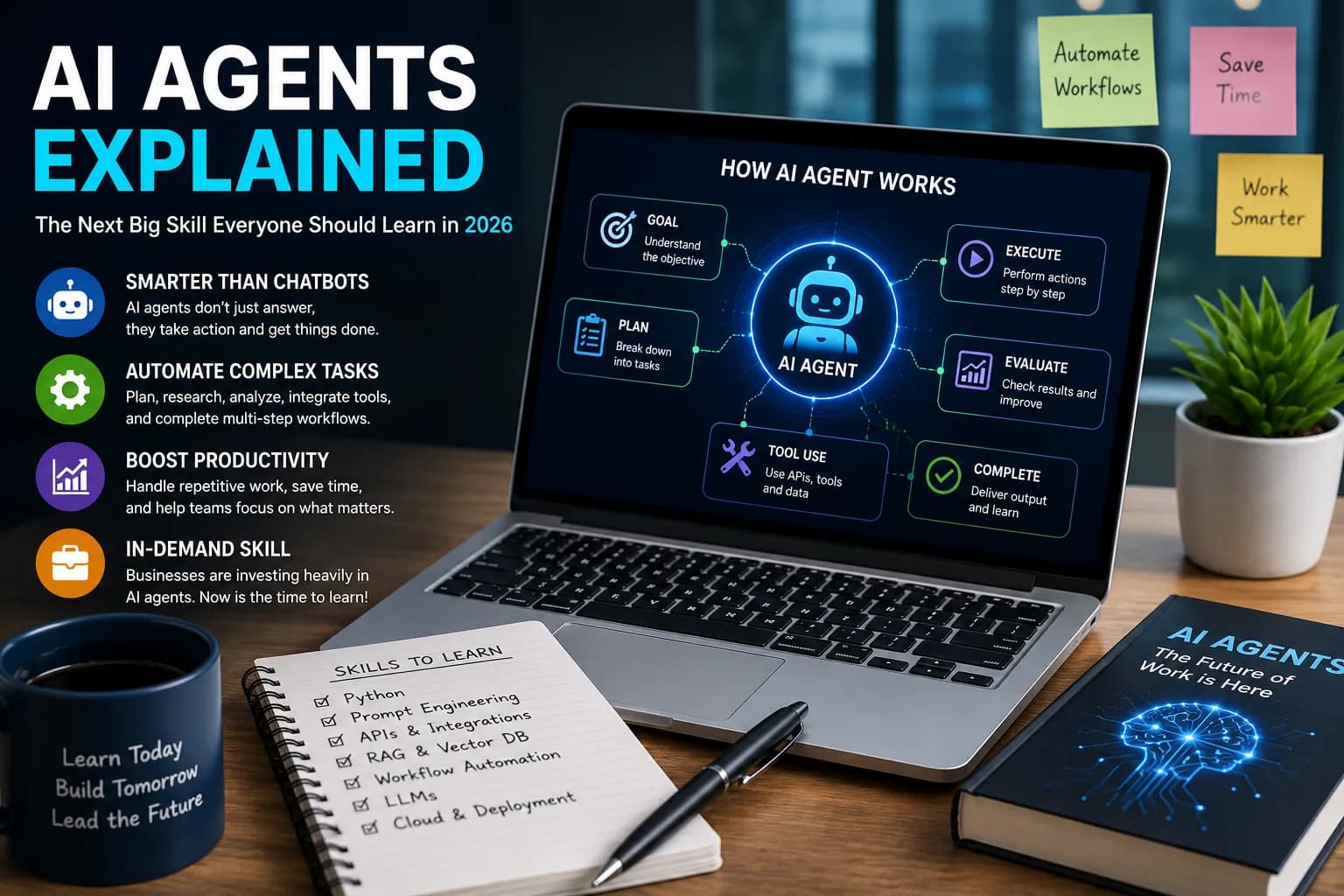
An AI agent is different because it doesn't stop at answering it acts. Give it a goal, and it breaks that goal into steps, decides which tool to use for each step, and works through the sequence with minimal hand-holding. In the Aria workflow, that meant the agent didn't just draft a call script it pulled lead data, generated the script based on that specific lead's profile, triggered the call, analyzed the transcript afterward, and decided whether the outcome needed a CRM entry, a booked meeting, or neither.
That's the actual difference between a tool that talks and a tool that works: an agent maintains a goal across multiple steps instead of resetting after every single prompt.
Why Everyone's Suddenly Talking About This
Every business wants the same thing get more done without proportionally increasing headcount for repetitive work. AI agents are attractive because they go after exactly the tasks that eat hours without needing much judgment: answering the fortieth version of the same support question, summarizing a document nobody wants to read in full, scheduling around six different calendars, entering the same data into three different systems.
None of that requires creativity. It requires consistency, which happens to be the one thing software is naturally better at than people.
Traditional AI Tools vs. AI Agents
That last row matters more than people expect. A chatbot giving you a bad answer costs you a re-prompt. An agent failing silently mid-workflow like ours did on that JSON import can mean a customer never gets a response, or a booking never gets confirmed. The stakes go up once the system starts acting instead of just talking.
What This Looks Like in Practice
Illustrative: Silent Failure
Support and service teams.
Our own customer support agent, BytezBot, handles first-line questions by pulling from a Pinecone knowledge base instead of guessing. Early on we had a bug where the AI Agent's output node wasn't wired correctly the model would generate a perfectly good answer that then went nowhere, and the customer got a generic fallback message instead. Small wiring mistake, real customer impact. Fixed now, but it's a good example of how "the AI part" is rarely where things actually break.
Voice and scheduling.
The Dr. Alex voice booking assistant we built handles appointment scheduling across four languages using Azure speech services. The agent has to listen, detect the language, understand the request, check calendar availability, and confirm all in a phone call, all in close to real time. Getting barge-in handling right (so the caller can interrupt the assistant mid-sentence, like a normal phone call) took several passes before it stopped feeling robotic.
Sales and outreach.
The Aria voice pipeline mentioned earlier does lead enrichment, call scripting, and CRM logging in one automated sequence, cutting out what used to be four separate manual steps per lead.
Recruiting and HR.
Agents can screen resumes against a role's actual requirements, draft interview questions from a job description, and handle initial candidate Q&A the repetitive first pass that used to eat a recruiter's morning.
None of these replace the person running the process. They remove the parts of the process that never needed a person in the first place.
Skills Worth Building If You Want In on This
You don't need all of these before you start. But if you're serious about working with agents, this is roughly the order I'd learn them in:
Prompt engineering
because every agent is only as reliable as the instructions behind it.
Python
most agent frameworks and automation tools expect at least basic scripting.
APIs
agents are only useful once they can talk to other software.
Workflow tools
(n8n, Zapier, or similar) this is where you'll actually build things without writing a full backend.
Vector DBs & RAG
Pinecone, or similar, for anything that needs to search a knowledge base instead of hallucinating an answer.
Redis / State Mgmt
because agents that "forget" mid-conversation are agents that fail mid-conversation.
Git
you will break things. You want to be able to go back.
Start with one working project instead of trying to learn all seven at once.
Build a Small One Yourself
You don't need a six-step voice pipeline for your first attempt. Something like this is a reasonable starting point:
Accept a request
A form, a chat message, an email trigger anything.
Search a source
A webpage, a document, a small database.
Summarize
Process what it finds.
Save the result
Store it somewhere accessible.
Send a notification
Alert when it's done.
That's the same shape as Aria, just smaller. Get that working end to end before you add a second data source or a second action that's exactly the mistake that cost us three rebuild cycles. We tried to get the full six-step pipeline running before any single step had been fully tested in isolation.
Mistakes I'd Tell a Beginner to Skip
Building the complex version first. Test each node, each API call, each piece in isolation before chaining them together. We learned this only after the workflow broke three times.
Trusting the output without checking the actual system state. An agent can report "task complete" and still have failed silently, especially in workflows with several connected tools. Always verify against the actual downstream system, not just the agent's own confirmation.
Skipping session and state management. If your agent needs to remember something across steps, plan for that explicitly don't assume it'll just carry over.
Ignoring what happens when a step fails. Every one of our production workflows now has explicit error handling on every node. That wasn't true in version one, and version one is why this rule exists.
Learning only from tutorials. Tutorials show you the happy path. Production breaks on the unhappy path. Build something real, even if it's small and rough.
Why This Matters for Where Your Career Is Headed
Employers aren't just hiring people who can use AI tools anymore they're increasingly looking for people who can build and troubleshoot the systems around those tools. That's a meaningfully different skill set than knowing how to write a good ChatGPT prompt.
Understanding how agents are structured the planning step, the tool selection, the state management, the failure points puts you in a position to build automation instead of just consuming it. That's true whether you're in marketing, support, recruiting, or engineering. The job titles differ; the underlying skill doesn't.
Where This Is Headed
The direction is fairly clear: fewer people manually stitching together five different apps to complete one task, more systems that coordinate those apps on their own and flag a human only when a decision actually needs one. We're not fully there yet plenty of "AI agent" products today still need a lot of babysitting but the gap between the demo and the reliable production version is closing steadily.
The professionals who'll benefit most aren't the ones who can talk about AI agents abstractly. They're the ones who've actually built one, broken it, and fixed it. Master these AI tools today to be prepared.
FAQ
Do I need to know how to code to work with AI agents?
Basic scripting helps a lot, especially Python, but a lot of agent building today happens in visual workflow tools like n8n where you're connecting nodes rather than writing a full application from scratch.
What's the difference between an AI agent and just automation with extra steps?
Traditional automation follows a fixed path every time. An agent makes decisions along the way it can choose which tool to use, adjust its approach based on what it finds, and handle situations that weren't explicitly scripted in advance.
How long did it actually take to get a working AI agent into production?
For the Aria voice pipeline, from first attempt to a stable, repeatable version was about three full rebuild cycles not because the concept was wrong, but because getting the connections between tools right takes real iteration.
Are AI agents going to replace jobs that use them?
They tend to replace specific repetitive tasks within a job rather than the job itself. The people we've seen benefit most are the ones who use agents to clear the repetitive load and then spend that time on the parts of the work that actually need judgment.
Read More in AI Tools for Work
How to Use AI Agents at Work in 2026: Practical Workflows, Tools, and Career Opportunities
Learn how AI agents can automate research, reporting, and daily workflows. Explore practical examples, useful tools, implementation steps, and safety tips.
Read article →
AI Agents Are Getting Access to Your Business: Why Identity Security Matters in 2026
One of our own automations was wired to a single API key meant only to check order status. A routine review found that same key could also delete listings and issue refunds. Nothing went wrong, but it easily could have.
Read article →