Master Prompt Engineering in 2026: The Framework I Use to Get AI to Actually Do What I Want
Table of Contents
Three weeks ago, our customer support chatbot told a live customer: "Your query has been processed. {{response_placeholder}}."
Not a test. Not a staging environment. A real person, asking a real question, got a literal unfilled template variable back as an answer. I found out because a colleague forwarded me a screenshot with the message "is this supposed to happen."
It wasn't the model's fault. I'd built the thing an AI Agent workflow in n8n, with Redis handling session memory and Pinecone as the knowledge base and the root cause turned out to be a system prompt with an unfilled placeholder that only triggered under a specific conversation path. GPT doesn't fill in blanks you left in your own instructions. It just repeats them back to you, confidently, like that's exactly what you asked for.
That bug taught me more about prompt engineering than any course could have. So this isn't going to be a generic "here are 5 tips" article. It's what I actually do, including the parts I got wrong first. To test and construct production-ready instructions interactively, you can also use our free Prompt Engineering Generator and Prompt Optimizer.
What Prompt Engineering Actually Is (And What It Isn't)
Prompt engineering is not a secret command language. It's not about finding some magic phrase that unlocks a "better" model hiding inside the one you're using. It's closer to writing a spec for a very literal, very capable new hire who has read everything but remembers nothing about your specific situation unless you tell them.
Here's the distinction that matters: the model isn't guessing what you mean. It's responding to what you wrote. Those are two different things far more often than people expect. Both of the prompts above are asking for the same document. Only one gives the model enough to work with. The gap between those two isn't "AI skill" it's just how much of your own thinking you've bothered to put on the page before hitting enter.
The Five Things Every Prompt Needs
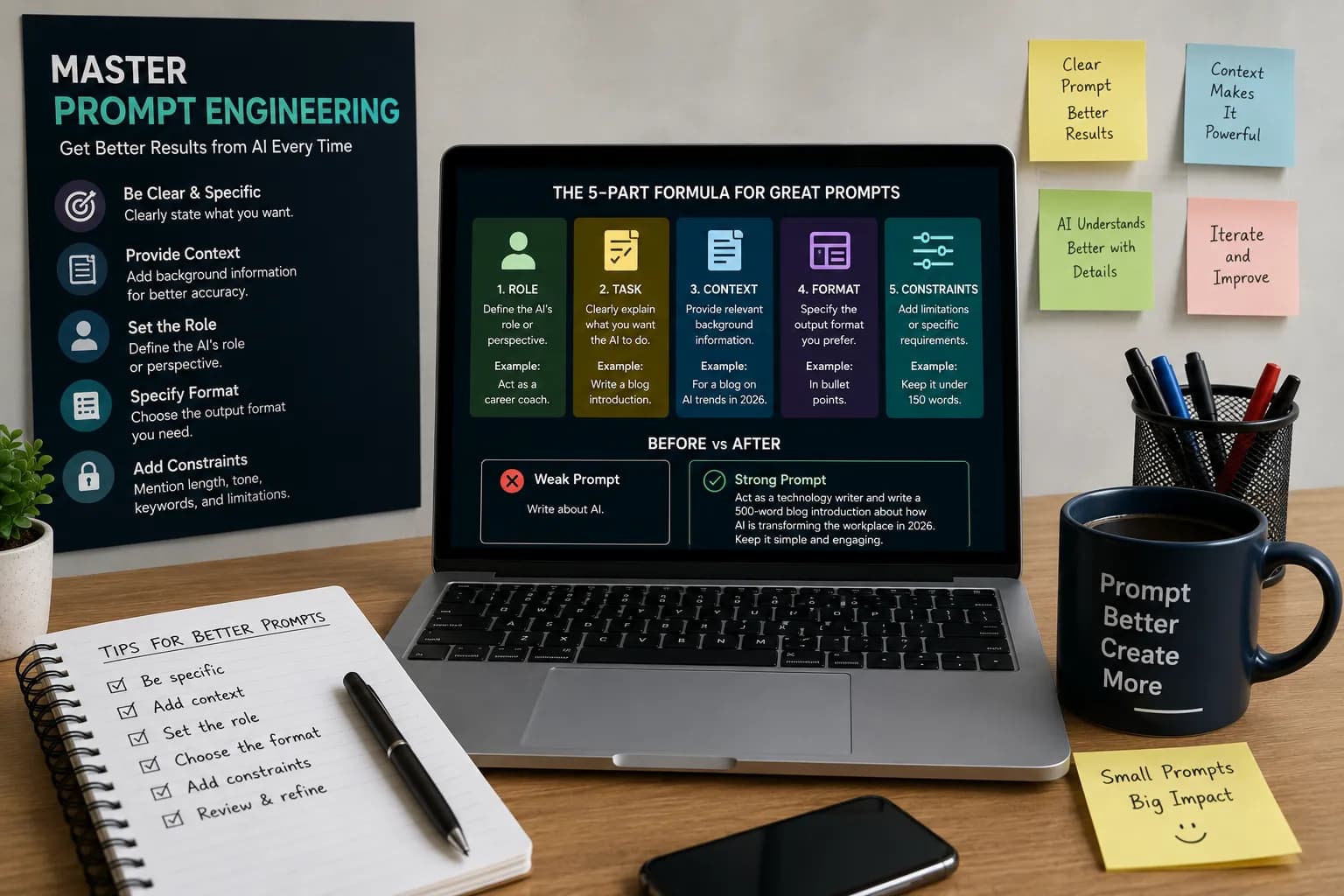
I used to keep a mental checklist. Now it's basically muscle memory, but breaking it down helps when you're stuck staring at a blank prompt box.
Role
Tell the model what hat to wear. "Act as a senior backend engineer reviewing this PR" produces noticeably different feedback than no role at all sharper, more opinionated, less hedged.
Task
Say the actual verb. Not "help with this," but "rewrite this paragraph to cut it from 200 words to 90 without losing the key statistic."
Context
This is the one people skip, and it's the one that matters most. When I was fixing the chatbot, half my early prompts to Claude for debugging just said "why isn't this working." Useless. The moment I pasted in the actual n8n workflow JSON, the Redis session structure, and the exact error trace, the quality of help I got jumped immediately not because the model got smarter, but because it stopped guessing.
Format
Table, JSON, bullet list, plain paragraph say which one. If you're piping the output into another system, specify the exact JSON schema or you'll spend the next twenty minutes writing a parser to handle whatever loose format came back.
Constraints
Word limits, tone, things to avoid. "No jargon," "under 150 words," "don't invent statistics" that last one specifically saved me from shipping a blog draft that confidently cited a "2024 Gartner study" that, as far as I can tell, doesn't exist.
A Real Before-and-After From an Actual Production System
When I was building the voice agent system we internally called "Dr. Alex" a FastAPI-based appointment booking assistant using Azure STT/TTS across four languages my first prompt to generate booking confirmation responses was terribly simple.
Voice Interface Output Quality
Prompt 1 (Vague)
Output (Robotic)
Prompt 2 (Structured)
Output (Natural)
The difference wasn't the model. It was that the second prompt told it who it was pretending to be and what a bad answer would sound like, not just what topic to cover. Fourteen words. Sounds like a person. Ships to production.
Comparison: Weak vs. Effective Prompts
| Element | Weak Prompt | Effective Prompt |
|---|---|---|
| Role | Not specified | "Act as a senior HR recruiter" |
| Task | "Help me with this" | "Rewrite this job description to cut buzzwords" |
| Context | None given | Includes actual resume, job posting, or error trace |
| Format | Unspecified | "Return as JSON matching this schema: {...}" |
| Constraints | None | "Under 150 words, no jargon, don't invent facts" |
| Result | Generic, needs heavy editing | Usable with minor tweaks |
Techniques That Go Beyond the Basics
Chain of tasks instead of one giant ask.
When I generated the 510-script test library for the Dr. Alex voice agent QA pass, I didn't ask for all 510 in one prompt that's a recipe for repetition and quality drop-off after script 40. I broke it into batches by category (booking, rescheduling, viewing, cancellation), reviewed each batch, then fed the approved style back in as a reference for the next one. Slower per-step, faster overall, and the quality stayed consistent from script 1 to script 510.
Batching Approach Workflow
Few-shot examples.
If you have one really good example of the tone or structure you want, paste it in and say "match this style." I do this constantly with n8n system prompts one good example beats three paragraphs of describing tone.
Ask the model to critique its own output.
After a first draft, ask: "What's weak about this? Where would an expert push back?" It's not infallible self-review, but it catches a surprising number of soft spots vague claims, missing edge cases, that kind of thing.
Give it a way to fail safely.
This one came out of the chatbot placeholder bug directly. Now, any system prompt I write includes an explicit instruction for what to do if a variable is missing or a lookup fails because I learned the hard way that the model will not tell you something's wrong. It'll paper over it and sound completely confident doing so.
Mistakes I've Actually Made
Assumed more context always helps. It doesn't past a point, extra irrelevant context dilutes the prompt and the model starts drifting toward whatever's most repeated, not what's most relevant.
Reused a prompt template across model versions without testing. A prompt tuned for one model config doesn't always transfer cleanly when you switch models or versions behavior around instructions can shift in ways that aren't obvious until output quality drops.
Trusted output without checking it against the actual source data. Especially with anything involving numbers or specific facts verify before it ships anywhere a customer will see it.
Skipped specifying failure behavior. See: the placeholder incident above. Now it's the first thing I add, not the last.
Where This Actually Pays Off
Prompt engineering isn't a novelty skill for people who "work in AI." It shows up anywhere you're asking a model to do real work:
- Debugging production code (pasting the actual stack trace beats describing the bug from memory)
- Writing documentation that doesn't read like it was written by nobody in particular
- Structuring data pipelines where the output needs to match an exact schema
- Interview prep, resumes, cover letters anywhere the "context" element is your actual background, not a generic template. Also perfect for job seekers!
A Step-by-Step Task You Can Do Right Now
Pick one AI task you do regularly a report, an email type, a piece of code you write often. Then:
- Write your current prompt exactly as you normally would.
- Run it and save the output.
- Rewrite the prompt adding all five elements: role, task, context, format, constraints.
- Run it again.
- Compare the two outputs side by side. Note specifically what changed not "it's better," but what got better: fewer follow-up questions needed, closer to final format, fewer factual gaps.
- Keep the improved version as your new template for that task.
Do this once and you'll feel the difference. Do it five times across different task types and it stops being a technique it becomes how you write prompts by default.
FAQ
Do I need to learn a specific syntax or programming language for prompt engineering?
No. It's plain language, structured clearly. The skill is being specific and organized, not technical syntax.
Why does the same prompt sometimes give different quality results?
Models have some built-in variability, and small context differences (conversation history, a slightly different phrasing) can shift output more than expected. If consistency matters, add explicit constraints and test the prompt more than once before relying on it.
Is prompt engineering still relevant as models get better at understanding intent?
Yes, but the failure mode also shifts. Even strong models can't read your intent if you haven't stated your context, constraints, or the format you actually need. Better models close some gaps; they don't close all of them.
What's the single highest-impact change I can make to my prompts today?
Add context. Of the five elements, it's the one most often missing entirely, and it's usually the one that moves output quality the most.
Read More in AI Tools for Work
How to Use AI Agents at Work in 2026: Practical Workflows, Tools, and Career Opportunities
Learn how AI agents can automate research, reporting, and daily workflows. Explore practical examples, useful tools, implementation steps, and safety tips.
Read article →
AI Agents Are Getting Access to Your Business: Why Identity Security Matters in 2026
One of our own automations was wired to a single API key meant only to check order status. A routine review found that same key could also delete listings and issue refunds. Nothing went wrong, but it easily could have.
Read article →