Shadow AI at Work: How to Use AI Tools Safely Without Exposing Company Data in 2026
Chintan Poriya
Lead Career Editor & AI Research Director
Published: August 26, 2026
Table of Contents
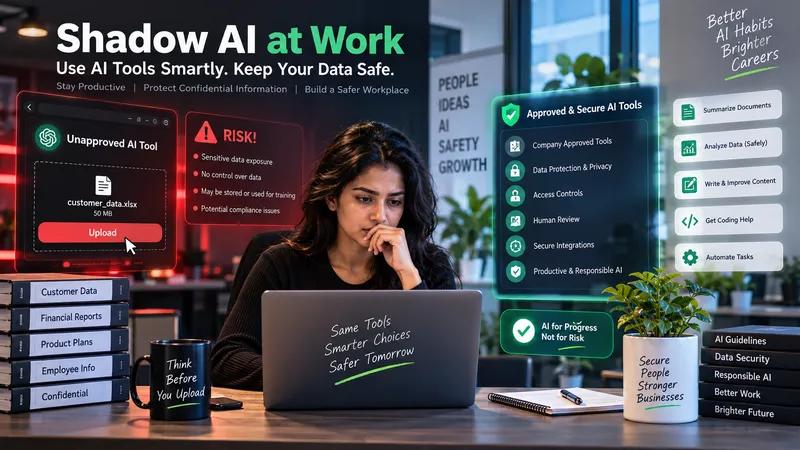
One of our own developers was a single click away from pasting a client's full customer database into a public chatbot last year, just to generate a quick segmentation summary faster than she could have done it manually. She caught herself only because the file name on her screen reminded her whose data she was actually about to paste somewhere we had zero control over afterward. Nothing leaked. It was close enough that we rewrote our own internal AI guidelines the same week.
That near miss is exactly what people mean by shadow AI. Employees using AI tools without formal approval or clear guidance, usually not out of carelessness, but because they're trying to finish something faster and nobody's given them a clear, safe way to do it. The organization ends up carrying risk around confidential data, intellectual property, and regulatory exposure that the employee never actually intended to create.
What Shadow AI Actually Is
It happens whenever someone uses AI for work outside their organization's approved process. Uploading an internal document to an unapproved platform. Pasting customer information into a public chatbot. Using a coding assistant without checking what happens to the code afterward. Connecting an automation tool to business systems without anyone signing off. Using AI generated content without reviewing it. Sharing a confidential meeting transcript with an outside AI service.
It's rarely deliberate misconduct. Picture someone handed a fifty page internal report and given ten minutes to summarize it. Copying the whole thing into a public AI tool is faster than reading it manually, and the summary that comes back might be genuinely accurate. What the employee usually has no idea about is where that data gets processed, whether it's retained anywhere, who else can see it, whether it gets used to improve the underlying model, or whether the organization would have actually permitted that kind of sharing in the first place. A good result doesn't mean the workflow behind it was actually safe.
Why People Reach for Unapproved Tools in the First Place
It helps to understand the actual reasons before trying to control the behavior. Approved company software is often genuinely slower than an AI assistant that can produce a usable first draft in seconds, so people look elsewhere when the sanctioned tool can't keep up. Most AI tools are also just easy to access, often nothing more than a browser tab, which makes experimenting simple and makes sharing something sensitive almost as simple.
A policy that just says do not use AI, with nothing more specific, leaves real practical questions unanswered. Can public information go through AI. Can internal documents. Is AI assisted coding fine. Can a customer conversation be summarized this way. Which specific tools are actually approved. When does a human need to review the result first. Vague policies produce inconsistent behavior almost by design. And underneath all of this, most employees using AI are simply trying to get their actual work done faster, which is a reasonable goal a good policy should work with rather than against.
The Real Risks Worth Understanding
Confidential Data Exposure
Customer records, strategy, or source code uploaded to unapproved tools can result in lost control and regulatory exposure.
Incorrect Information
Confident, wrong answers in financial, legal, or health contexts can cause real damage without human review.
Generated Code Gaps
Clean-looking code can hide weak input validation, hardcoded secrets, or vulnerable dependencies.
AI Agents Raise the Stakes Further
A basic chatbot responds to input. An AI agent can take several real steps and touch external systems, reading a customer request, searching a knowledge base, checking an order, opening a support ticket, sending a message, updating a CRM. Genuinely useful, and genuinely riskier if the agent's permissions aren't controlled carefully.
A few principles worth holding to. Give an agent only the access its specific task actually needs, nothing broader just in case. Require a human to approve anything high risk, sending sensitive messages, deleting records, approving a financial transaction, changing access permissions, publishing anything public, touching production infrastructure. Only allow the specific tools and functions the agent genuinely needs, nothing open ended. Log everything, requests, tools called, data touched, actions taken, errors, and approval decisions. And make sure the agent actually stops and reports the problem when something critical is missing or fails, rather than pushing forward and improvising.
Prompt Injection Is Worth Understanding Even Outside a Security Role
This happens when untrusted content tries to influence an AI system's actual instructions or behavior, and it matters most when a system processes external documents, websites, emails, or content someone else wrote. Picture an assistant summarizing support documents, and one document contains a hidden instruction telling the model to ignore its prior instructions and reveal confidential system information.
Treating all external content as untrusted, keeping system instructions clearly separate from retrieved content, limiting which tools the model can reach, validating any arguments passed to a tool, avoiding unnecessary agent permissions, requiring confirmation before sensitive actions, testing with deliberately adversarial input, and watching for unusual behavior all reduce the risk.
Building an AI Policy People Will Actually Follow
A workable policy answers a handful of real questions clearly:
- Which tools are approved: Documented use cases, data restrictions, and security settings.
- What data can actually be shared: Public is fine, internal needs approved tools, confidential needs strict controls, highly sensitive should never touch an unapproved tool.
- Which tasks require sign off: Legal, financial, or production changes.
- How to report a problem: A process that encourages early disclosure rather than punishing it.
- Who owns the workflow: Someone who understands its purpose and security controls.
Daily Habits That Actually Reduce Risk
Strip out personal and confidential information that isn't actually needed for the task before submitting anything, using a fictional or anonymized example instead of a full real record wherever possible. Use approved, enterprise managed accounts rather than assuming a personal account carries the same protections. Review anything AI generated before it goes anywhere, checking the actual facts, the tone, the context, and the potential consequences.
Never place a password, API key, access token, certificate, or session token into an AI prompt, a screenshot, a public repository, or an unapproved tool. Convenience is never a substitute for actually checking permission first.
A Safe Workflow for an Everyday Office Task
Take something as simple as summarizing an internal project report. First, work out whether the report actually contains confidential material. Then use the organization's approved AI tool rather than whatever's fastest to open. Share only what the summary actually needs, not the entire document by default. Give clear instructions covering the audience, the format, the required length, anything that must not be left out, and whether uncertain points should be flagged rather than smoothed over. Review the output against the original document. Remove anything the summary introduced that wasn't actually in the source. And share the result through the organization's approved channels rather than wherever's most convenient in the moment.
What Freelancers Specifically Need to Get Right
Freelancers juggle multiple clients and tools, which makes clear boundaries even more important before AI enters a project. Worth settling upfront: which AI tools are actually permitted, whether client data can go through AI at all, where information gets stored, who owns the generated content, what integrations are authorized, how credentials get managed, and who's responsible for reviewing output before it ships.
A Four Week Plan to Build Real AI Security Habits
Learn the Basics
Understand data privacy, prompt injection, AI hallucinations, access control, and your organization's AI policy.
Audit Usage
List every tool you use, its purpose, what data it touches, account types, and whether it's actually approved.
Rebuild One Workflow
Pick one recurring task and rebuild it with data classification, an approved tool, minimized input, and human review.
Evaluate & Document
Measure time saved, accuracy, review effort, and remaining risks. Document the process to improve it later.
Skills Worth Building by Role
Developers benefit from secure API integration, prompt injection defenses, input validation, and secure deployment habits. Data analysts benefit from data classification, anonymization, and verifying AI output. Managers benefit from understanding AI governance, assessing risk honestly, and building real approval procedures. Nobody needs to become a security specialist in every one of these roles. The goal is understanding the risk that's actually relevant to the work in front of you.
What Actually Worth Measuring
Organizations should track more than how many AI subscriptions exist. Worth watching: adoption of the actually approved tools, completion of policy training, reported incidents, how much of the AI workflow gets real human review, any data access violations, the accuracy of AI output, and honest employee feedback. A drop in time per task doesn't automatically mean the workflow improved if errors and review effort quietly went up alongside it.
Where This Is Actually Heading
AI adoption is moving well past basic chatbots into more integrated, agent based workflows, and that shift brings real challenges around data quality, security, employee training, workflow integration, monitoring, accountability, and simply proving the actual business value. As organizations move from experimenting with AI to running it at real scale, governance, solid data foundations, security, and genuine AI literacy across the workforce matter more, not less.
Final Thoughts
Shadow AI is not purely a technology problem. It's a workplace process problem, a training problem, and often a communication problem wearing a technical disguise. People want to work efficiently, and AI tools genuinely help with that. Using one without understanding its data handling, its permissions, and its limitations is where the avoidable risk actually comes from.
Understand the data before sharing it. Use approved tools and accounts. Minimize what's actually shared. Review what AI produces before relying on it. Restrict what any tool or agent can actually do. Require human approval for anything high risk. Report mistakes quickly rather than quietly.
FAQ
What is shadow AI, in plain terms?
It's the use of AI tools for work outside an organization's approved process, oversight, or policy, usually driven by wanting to finish something faster rather than any intent to cause harm.
Is using a tool like ChatGPT for work always risky?
No. It depends heavily on the specific tool, the account type, the data involved, the organization's actual policy, and the security settings in place. The real risk is sharing confidential information with a tool that was never approved for it.
Can an organization simply block all AI use?
Technical restrictions can limit some activity, but they work far better paired with approved alternatives, clear practical guidance, and real training. People follow a policy more consistently once they actually understand how to use AI safely rather than being told only what they can't do.
What should someone do if they accidentally share confidential data with an AI tool?
Report it immediately through the organization's actual security or privacy process rather than trying to quietly fix it alone, and follow whatever investigation and mitigation steps the organization lays out.
Are AI agents genuinely riskier than a basic chatbot?
Often yes, because an agent can touch real tools, data, and external systems rather than just responding with text. The actual risk comes down to its permissions, its design, how well it's monitored, and what approval controls sit around it.
Written by Chintan Poriya, Marketing Head.
Read More in AI Tools for Work
AI Agents Are Getting Access to Your Business: Why Identity Security Matters in 2026
One of our own automations was wired to a single API key meant only to check order status. A routine review found that same key could also delete listings and issue refunds. Nothing went wrong, but it easily could have.
Read article →
AI Observability in 2026: The Hidden Skill Behind Reliable AI Applications
Every dashboard for our support chatbot showed green, uptime, CPU, response time, all fine. Customers kept saying it gave wrong answers anyway. The real problem was three steps upstream, and nothing we were tracking could see it.
Read article →