How Small Businesses Can Use AI Automation to Save Time in 2026
Chintan Poriya
Lead Career Editor & AI Research Director
Published: August 12, 2026
Table of Contents
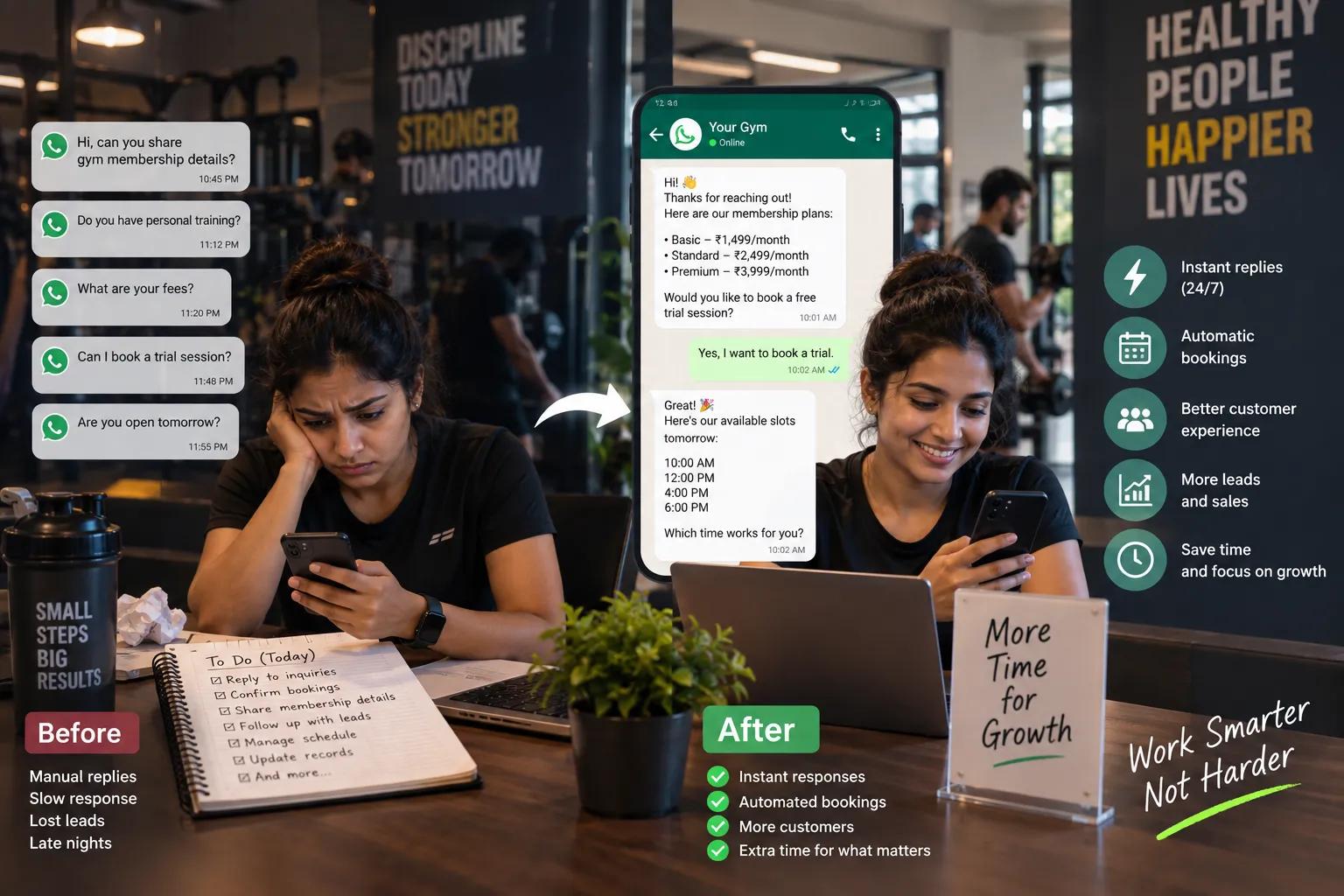
A gym owner we worked with in Ahmedabad was manually confirming every membership inquiry that came in over WhatsApp, sometimes replying well past midnight after closing up for the day. Even with that effort, she was still losing leads regularly, mostly to people who messaged a competing gym while waiting hours for a reply. We helped her automate the first response and the initial booking confirmation. Reply time dropped from hours to under a minute, and she told us afterward that she'd gotten roughly two real hours back every evening, hours she used to spend glued to her phone answering the same handful of questions over and over.
That's the actual case for AI automation in a small business. Not a sweeping transformation of everything at once, just a small, repetitive part of the day handled well enough that it stops eating time it never needed to.
Slow Replies & Lost Gym Inquiries
- ✗ Confirming WhatsApp inquiries manually after hours, often past midnight.
- ✗ Prospects messaging competing fitness clubs while waiting hours for replies.
- ✗ Over 2 hours wasted every evening typing the same membership & pricing answers.
- ✗ Leads dropping off before completing an introductory tour or trial class.
Instant Answers & Automatic Bookings
- ✓ First response time plunged from several hours to under 60 seconds.
- ✓ Instant qualification and automated scheduling for introductory trial sessions.
- ✓ Owner reclaimed 2 full hours every evening away from repetitive messaging.
- ✓ Smooth fallback to human staff only when nuanced inquiries demanded it.
What AI Automation Actually Is
It's artificial intelligence combined with an automated workflow, built to complete a repetitive task with very little manual effort once it's set up properly. A business can use it to answer common customer questions, draft marketing content, organize customer information, run email campaigns automatically, look through sales data for patterns, handle appointment scheduling, and generate routine reports. None of this replaces judgment on the harder decisions. It replaces the repetitive, predictable ones that were never a good use of a business owner's actual time in the first place.
Customer Support
24/7 instant replies over WhatsApp and web chat, handling pricing FAQs, location queries, and initial lead intake.
Marketing Content
Drafting engaging social captions, local promotional offers, email newsletters, and content calendars in minutes.
Email Automation
Triggering timely onboarding emails, appointment reminders, post-purchase check-ins, and personalized re-engagement.
Data & Analytics
Spotting top-selling offerings, peak customer hours, churn patterns, and quiet revenue leaks across sales logs.
Appointment Booking
Self-serve scheduling that syncs with real calendar slots, eliminates phone tag, and dispatches instant confirmations.
Routine Reporting
Automating end-of-week revenue summaries, client attendance tracking, and administrative record-keeping.
Automate Customer Support First
This is usually the highest leverage place to start, and it's exactly where the gym automation began. AI chatbots can answer frequently asked questions, share basic product or service information, and walk a customer through a simple process without a human needing to type the same answer for the fifteenth time that week. Connecting a chatbot to WhatsApp, a website, or an existing customer management system extends this even further. The real benefits show up fast, faster replies, less repetitive manual work, coverage outside normal business hours, and a noticeably better customer experience overall. Anything genuinely complex or sensitive should still route to an actual person, and building that handoff in cleanly from the start matters more than people expect.
As customer support workflows mature, businesses increasingly transition from simple canned responses to autonomous AI agents capable of looking up customer history, verifying appointment availability, and updating CRM records before handing off to staff.
Let AI Help With Marketing, Then Review Everything It Produces
Producing consistent marketing content is a real drain for most small businesses. AI tools can generate social captions, blog topic ideas, email campaign drafts, product descriptions, ad concepts, and a rough content calendar to work from. None of it should go out unreviewed. Checking for accuracy, originality, and whether it actually sounds like the business's own voice is a five minute step that saves a much bigger headache later, especially the first few times a new tool is in use.
Getting high-caliber output from generative models starts with practical prompt engineering—giving the AI clear context on your ideal customer, specific tone guidelines, and examples of your best past announcements before asking it to write.
Automate the Predictable Parts of Email
Email automation makes sure the right message goes out at the right moment without someone having to remember to send it manually. Welcome emails for new customers. Follow ups after an inquiry that hasn't converted yet. Appointment reminders. Promotional campaigns timed to something relevant. Feedback requests after a purchase or a completed service. Pairing this with a bit of AI assisted personalization keeps the messages feeling less like a mass blast and more like something written for that specific customer, while still running almost entirely on its own.
Use AI to Actually Look at the Data Being Generated
Every small business generates real data through sales, customer interactions, website visits, and marketing activity, and most of it goes unexamined simply because nobody has the time to dig through it manually. AI powered analytics tools can surface which products are actually selling best, what customers genuinely prefer, how a specific campaign performed, where revenue is trending, and where an operational problem might be quietly costing money. Decisions made from this kind of insight tend to hold up a lot better than decisions made from a gut feeling or an assumption that's gone unchecked for months.
You don't need to hire a full-time analyst to extract value from your numbers. Becoming a proficient AI power user simply requires feeding your monthly spreadsheets into an LLM and asking targeted questions to spot where revenue is quietly slipping.
Automate Appointment Scheduling if That's a Real Bottleneck
Consultants, clinics, agencies, and service based businesses in particular spend a surprising amount of time just managing appointments back and forth. AI powered scheduling lets a customer check real availability, book directly, get an automatic reminder, reschedule without a phone call, and receive a confirmation without anyone on the business side lifting a finger. This alone tends to cut down scheduling errors noticeably and removes a genuinely tedious back and forth from both sides of the conversation.
Mistakes Worth Avoiding Before Automating Anything
While automation unlocks immense leverage, rushing in without clear boundaries creates avoidable chaos:
❌ Trying to Automate Everything at Once
Not every task should be handed to automation. Genuinely complicated decisions and real customer complaints still need human judgment. Treating automation as an across-the-board silver bullet causes more frustration than it saves.
❌ Ignoring Customer Data Privacy
Customer information needs careful handling, and not every AI tool is suitable for sensitive data. Verify privacy terms and data retention policies before connecting customer records to third-party tools.
❌ Stacking Disconnected Tools
Several isolated apps that don't talk to each other create their own kind of chaos, often worse than the manual process they replaced. Prioritize tools that integrate cleanly with your WhatsApp, CRM, and calendar.
❌ Never Reviewing What AI Produces
AI generated content and automated decisions can contain subtle errors or misaligned tone. A brief human review step on business-critical communications is essential to protect brand trust.
A Six Week Rollout Schedule for a First Automation Project
A disciplined, step-by-step rollout minimizes customer disruption while giving your team time to measure real time savings:
Audit Repetitive Tasks
Sit down and list every repetitive task eating real time during a normal week. Be specific and quantify hours lost to each.
Pick One High-Impact Task
Select the single highest friction bottleneck costing the most hours or missed sales, and choose one tool built to automate it.
Build a Test Sandbox
Set up the automation in a limited test form with sample inquiries rather than immediately exposing it to every customer.
Run Side-by-Side Trial
Run it alongside your existing manual process for comparison. Track reply times, hours saved, and real customer reactions.
Refine & Expand to 100%
Review edge cases, refine system prompts, and expand the automation to your full customer base once it's thoroughly verified.
Document & Scale Next Flow
Document key learnings and procedures, then identify the next repetitive business workflow worth automating using the same formula.
This is close to the actual pace the gym automation followed, starting small with just the first WhatsApp response before expanding into the full booking confirmation flow once the first piece was clearly working.
Final Thoughts
AI automation is changing how small businesses handle the parts of their day that never needed a human's full attention in the first place. Customer support, marketing content, email follow ups, data analysis, appointment scheduling, all of it can run with far less manual effort once it's set up thoughtfully.
The goal was never to replace every human task in the business. It's to free up the hours that were quietly going to repetitive work so they can go toward the parts of the business that actually need a person's judgment and attention. Start with one workflow, measure what it actually saves, and expand from there once it's proven itself, the same way a single automated WhatsApp reply turned into two real hours back every evening for one small business owner.
FAQ
Which task should a small business automate first if they can only start with one?
Whichever repetitive task is costing the most time or causing the most missed opportunities right now. Customer support and appointment scheduling are common starting points because the impact tends to show up quickly.
Is AI automation affordable for a genuinely small business, or is it mainly for larger companies?
Plenty of AI automation tools are priced for small business budgets specifically. The gym automation in this article's opening was a modest, affordable setup, not an enterprise scale system.
Will customers notice they're talking to an automated system, and does that hurt the experience?
Some will, and that's generally fine as long as the handoff to a real person is smooth whenever something genuinely needs one. Clear, fast, accurate automated responses tend to improve the experience more than they hurt it.
How long does it typically take to see real results from a first automation project?
Often within a few weeks of a properly scoped rollout, similar to the six week schedule above. The gym's response time improvement was visible almost immediately once the automation went live.
Written by Chintan Poriya, Marketing Head.
Read More in AI Tools for Work
AI Agents Are Getting Access to Your Business: Why Identity Security Matters in 2026
One of our own automations was wired to a single API key meant only to check order status. A routine review found that same key could also delete listings and issue refunds. Nothing went wrong, but it easily could have.
Read article →
AI Observability in 2026: The Hidden Skill Behind Reliable AI Applications
Every dashboard for our support chatbot showed green, uptime, CPU, response time, all fine. Customers kept saying it gave wrong answers anyway. The real problem was three steps upstream, and nothing we were tracking could see it.
Read article →